
GPIO
The photobooth supports Raspberry Pi GPIO to trigger certain events. Currently supported triggers are:
- Capture actions (input)
- Picture, default GPIO 27, press
- Collage, default GPIO 22, press
- Animation, default GPIO 24, press
- Video, default GPIO 25, press
- Share actions (input)
- Print most recent image, default GPIO 23, press
- System pins (input)
- Shutdown host, default GPIO 17, hold 2 seconds
- Reboot host, default GPIO 18, hold 2 seconds
- Digital output (via plugin)
- Light, default GPIO 2
- Reserved otherwise when using a UPS, controlled by dtoverlays.
- Power loss detection, depending on setup, usually GPIO 6
- Cut power of UPS, depending on setup, usually GPIO 26
Internally gpiozero python implementation is used.
Raspberry Pi GPIO wiring
To use the hardware triggers wire a normally open button from GND to the designated GPIO (active low). The photobooth-app enables the Raspberry Pi's internal pull-up resistors if not otherwise noted. Example: To shutdown the host connect a button switch to GND and GPIO 17.
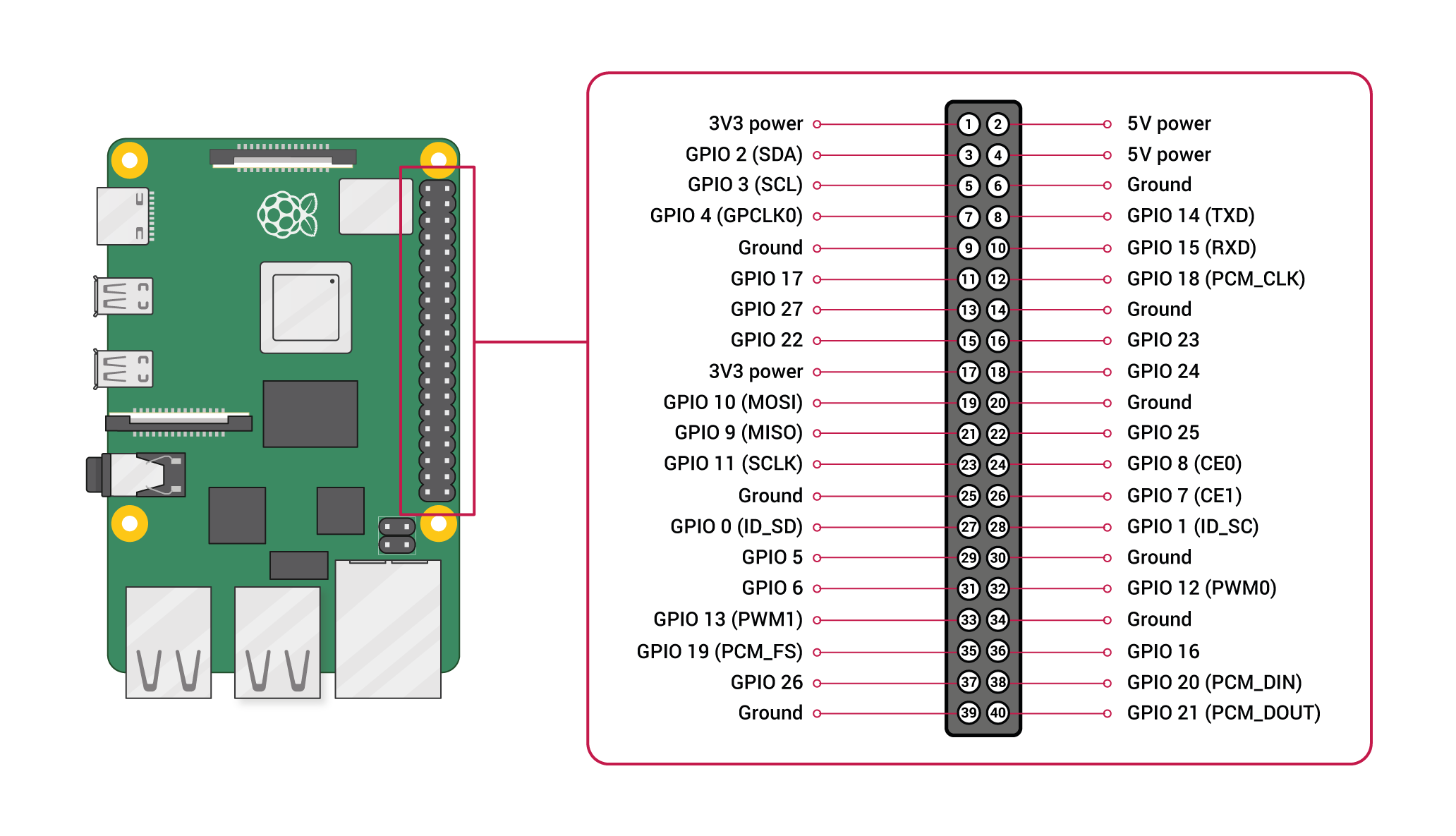
Configure
In the admin panel tab hardwareinput enable the GPIO feature in general. Then configure the GPIOs in the actions according to your wiring.